

TechSideline.com is pleased to announce the addition of a "Follow" feature to our message boards. This new feature enables you to follow posters and receive a Notification when someone you're following posts.
When you're looking at a post on our message boards, you'll now see a "Follow" button under the poster's avatar, as shown below.
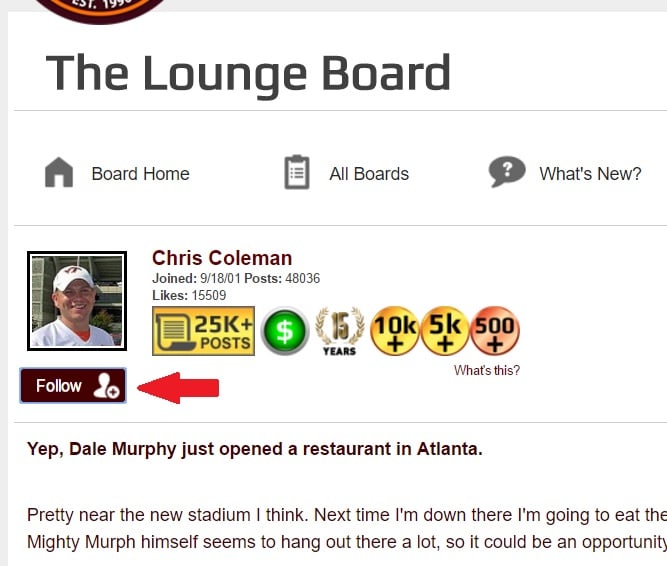
Once you click that button, you're "Following" that person, and the button will change to a "Following" button, as shown below.

In this example, when Chris Coleman posts, I'll get a Notification in the header. A little red number will appear next to the bell icon in the header, and if I click the bell, I see that Chris just posted, "These pretzels are making me thirsty." Clicking on that Notification will take me to the post.
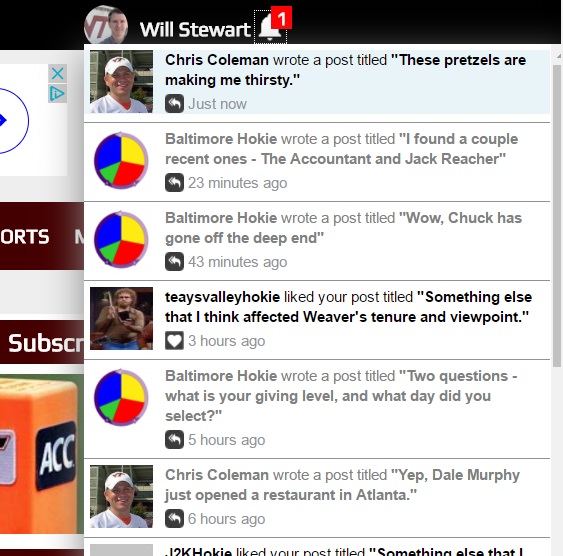
That's all there is to it. There's more we can do to enhance the feature, but we wanted to roll out this simple implementation and get feedback.
Please leave your comments, bug reports, and questions below. Thanks!